Recently, I was looking online at a University in the UK and I was shocked that there wasn’t any basic schema in place. One in particular; Organisation. If you’re not familiar with Organisation Schema, in a nutshell, it helps Google to identify key business information which can be used in the knowledge panels within Search. Here is an example with Dunelm. If you Google “Dunelm”, Google has identified this as a brand search and it has pulled in what it knows about Dunem within the knowledge panel:
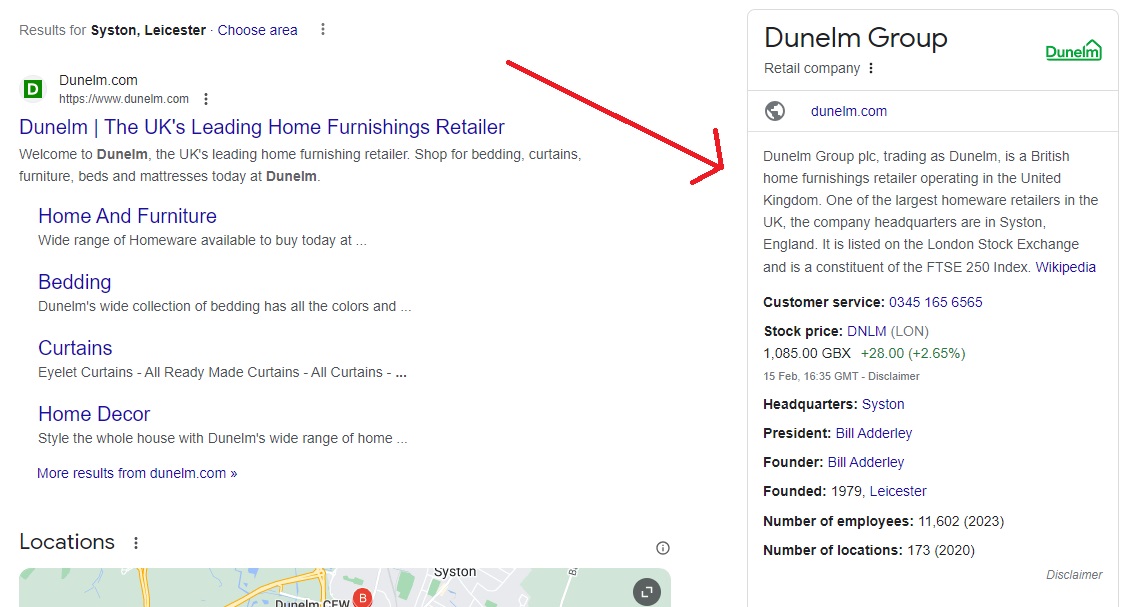
Organisation Schema will give search engines additional information about your brand/organisation/business which it might not have gathered from other sources. It will help to connect the dots.
Google has some pretty impressive statistics on why Schema is so important for websites, as there is an increased chance for additional visibility in search results, as seen above. I’d always recommend implementing Schema, and I’ll now show you how to create Organisation Schema. Remember, Schema is NOT a ranking factor BUT it can have an impact on user behaviour within search engines. From Google:
Introduction to structured data markup in Google Search, https://developers.google.com/search/docs/appearance/structured-data/intro-structured-data#why
- Rotten Tomatoes added structured data to 100,000 unique pages and measured a 25% higher click-through rate for pages enhanced with structured data, compared to pages without structured data.
- The Food Network has converted 80% of their pages to enable search features, and has seen a 35% increase in visits.
- Rakuten has found that users spend 1.5x more time on pages that implemented structured data than on non-structured data pages, and have a 3.6x higher interaction rate on AMP pages with search features vs non-feature AMP pages.
- Nestlé has measured pages that show as rich results in search have an 82% higher click through rate than non-rich result pages.
Adding Organisation schema will not guarantee the above, but its to give an insight into what you might see if you start to utilise Schema, as there are endless possibilities with it (which I’ll cover more separately)
What you need to implement Organisation Schema
You can implement Organisation Schema in a few ways but as you can guess from the title of this post, the way I’ll be showing you is through Chat GPT, using a GPT which I created.
This is what you’ll need:
- Ability to edit your homepage or a page about your business/organisation e.g. about-us. You’ll need to be able to edit one of these pages
- Access to Chat GPT 4.0
- Information about your organisation:
- Name
- Legal name
- Description
- URL of your logo
- URL of your organisation
- URLs of 3rd party websites about your organisation e.g. LinkedIn
- Postal Address
- Contact points for people to contact your business
- Number of employees
- Founding date
Once you have the above, you’re ready to go
Using Chat GPT 4.0
Within Chat GPT, you can search within public GPTs for “Organisation Schema Generator” (make sure its by S Matharu ;)) or go directly to it via https://chat.openai.com/g/g-aqpQWqqkW-organisation-schema-generator

Click on “Create an Organisation Schema for me”. Now, Chat GPT will ask you questions about your organisation, which I listed above. E.g:
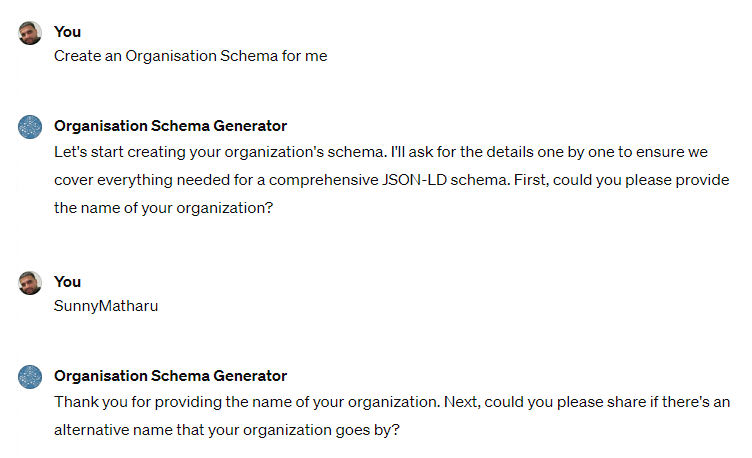
Once you’ve answered all of the questions, you’ll then get a JSON output ready for you to test:

The information above is fictional for this example, but you can see that after Chat GPT has prompted me for answers, it has now outputted a JSON script ready for me to test to ensure no errors. Copy and paste the code into either of the testing tools available at https://developers.google.com/search/docs/appearance/structured-data.
If there are no errors, you’re ready to now paste this within the <head> tag of either your homepage or your About Us page and once you’ve updated and saved your changes, you’ll see more insightful knowledge panels in search results for your company.